A Step-by-Step Guide
BONUS: LinkedIn Best Practices Guide
🎯 What This Guide Is For
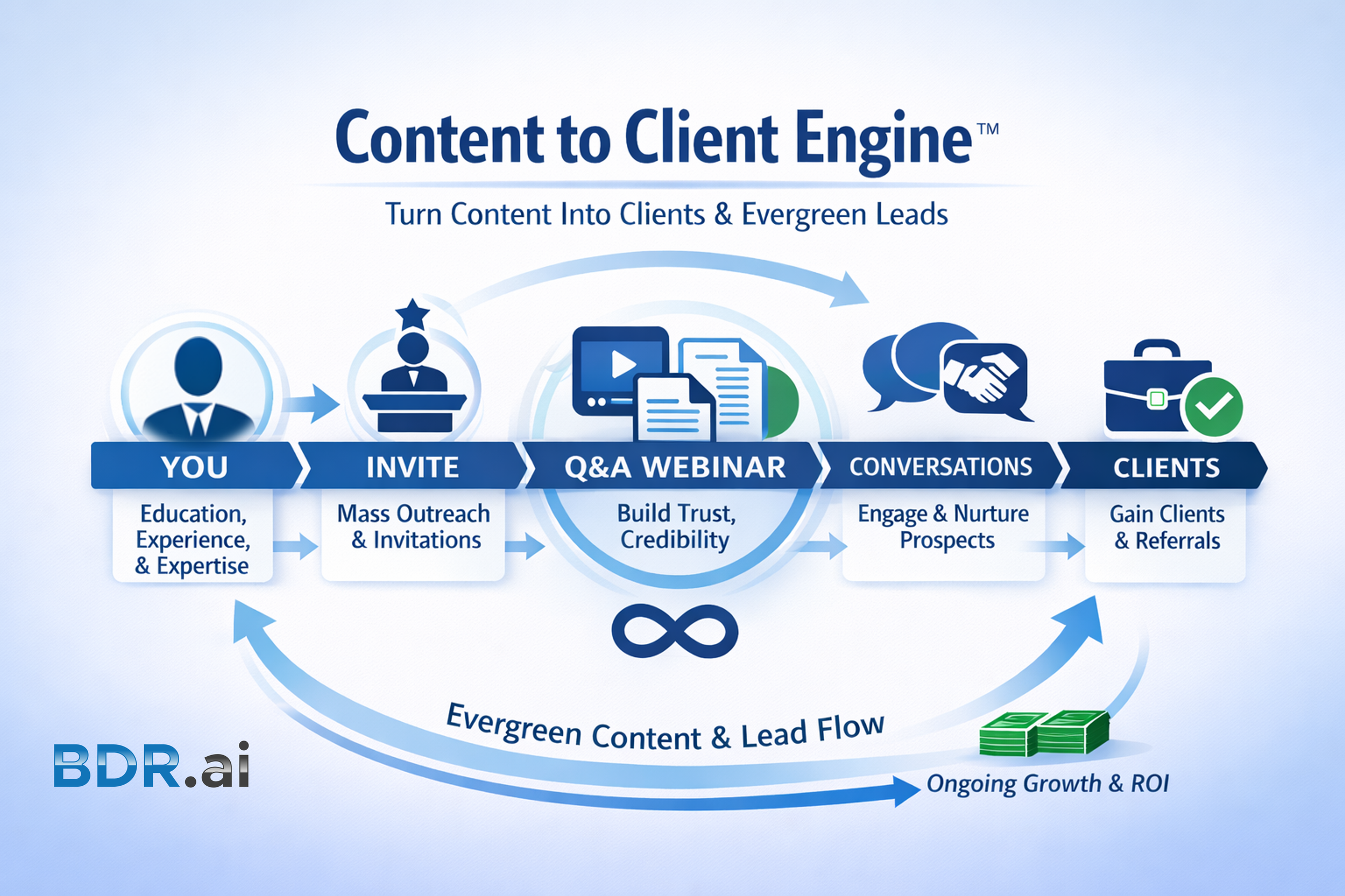
This guide shows you exactly how to use LinkedIn Events as a warm-lead engine not just to host events, but to consistently start real conversations with the right people.
Best for:
Business owners
Consultants & coaches
B2B sales leaders
🧠 The Big Idea (Read This First)
LinkedIn Events work because they:
Trigger LinkedIn notifications (free reach)
Give you a reason to start warm conversations with urgency, exclusivity, scarcity and reciprocity
Turn visibility into permission-based follow-up while transferring trust, credibility and authority
The mistake most people make:
They treat LinkedIn Events like a calendar invite… not a relationship-builder.
✅ Step 1: Pick the Right Event Format (Keep It Simple)
Choose ONE of these proven formats:
✔ Live Q&A
✔ Expert Interview
✔ “How We’re Solving This Problem” Session
✔ Case Study / Behind-the-Scenes
✔ Roundtable Discussion
Sweet spot:
45–60 minutes
One clear problem
One clear outcome
👉 If you can’t explain the value in one sentence, it’s too complicated.
📝 Step 2: Create a Scroll-Stopping Event Title
Use this formula:
The Result + The Mechanism + The Audience
Examples:
How Business Owners Are Turning LinkedIn Conversations Into Consistent Referrals
How Coaches Are Booking More Qualified Intro Calls Without Cold Outreach
How Consultants Are Using LinkedIn Events to Create Warm Sales Conversations
🚫 Avoid:
Generic titles
Buzzwords
“Join us for a webinar…”
SAMPLE AI PROMPT:
Help me create a webinar title with 75 or less characters and powerful description that addresses the Pain/Problems my target audience (INSERT TARGET AUDIENCE DETAILS HERE) are experiencing and how I can I assist them to reduce or eliminate the pain and problems they’re experiencing and create the outcome they desire through my services, expertise, experience and education. Use (INSERT WEBSITE LINK HERE OR POST FULL BIO HERE) for reference.
🖼 Step 3: Design a Simple, Professional Event Banner
Recommended size: 16:9 (1920 × 1080)
Include ONLY:
Event title
Host(s) name(s)
Date & time
“Live Q&A” or “Ask Your Questions Live”
📌 Clean > clever
📌 Clear > crowded
SAMPLE AI PROMPT:
Help me create a 16:9 LinkedIn Event Header graphic using the attached image of me (INSERT YOUR NAME AND TITLE HERE) for (INSERT DATE/DAY/TIME/TIMEZONE/DURATION HERE).
🧩 Step 4: Write an Event Description That Converts
Use this 4-part structure:
1. Call out the problem
SAMPLE: Most professionals are visible on LinkedIn… but struggle to turn attention into real conversations.
2. Position the event
SAMPLE: This live session will show you how to use LinkedIn Events to consistently generate warm leads.
3. Bullet the outcomes
SAMPLE:
How to promote without spamming
How to follow up naturally
How to turn attendees into conversations
4. Invite interaction
SAMPLE: Bring your questions. This will be practical, not theoretical.
🔔 Step 5: Publish the Event 21+ Days Out
Why this matters:
LinkedIn promotes events over time
You want multiple touchpoints
People need reminders (even if interested)
📅 Ideal timing:
Tues–Thurs, 11 AM–2 PM local time
📣 Step 6: Promote the Event the Right Way (This Is the Gold)
Weekly cadence: 3 posts a week
1 event post
1 personal insight post
1 direct invite message
Simple DM invite script:
Hey [Name], I’m hosting a short LinkedIn virtual event on [topic]. Thought of you, want me to send you the link?
✔ Personal
✔ Low pressure
✔ Permission-based
SAMPLE AI PROMPT:
Help me create a 30 day pre-webinar and 30 day post-webinar marketing plan including social media posts, emails, texts, direct messages, and phone scripts to help me promote the event.
🤝 Step 7: Turn Registrations Into Warm Conversations
This is where 50+ warm leads/month comes from 👇
Before the Event
Thank them for registering
Ask ONE simple question: “What made this topic relevant for you right now?”
During the Event
Encourage comments & questions
Acknowledge attendees by name
Invite engagement (polls, chat prompts)
After the Event
Follow up within 24–48 hours:
“Thanks for showing interest in my recent event (TITLE), what was most useful for you?”
🎯 This is a conversation starter, not a sales pitch.
🔁 Step 8: Repurpose Once, Win Twice
After the event:
Post a recap
Share 1–2 short clips
DM attendees the replay
Invite continued conversation
One event =
✔ Content
✔ Conversations
✔ Leads
✔ Authority
📊 Step 9: Track What Actually Matters
Forget vanity metrics.
Track:
Conversations started
Replies received
Registrations
Meetings booked
Follow-up momentum
💡 Events are not about attendance. They’re about relationship velocity.
🚀 Pro Tip: Systemize This for Predictability
If you:
Host 1–2 events/month
Invite intentionally
Follow up consistently
You’ll build a repeatable warm-lead engine instead of starting from scratch every month.
This is where automation + personal touch = scale.
✅ Quick Setup Checklist (One-Page Summary)
☐ Clear event topic & outcome
☐ Compelling title
☐ Clean banner graphic
☐ Event description written
☐ Published 14–21 days out
☐ Weekly promo posts scheduled
☐ Personal invites sent
☐ Follow-up messages ready
🔑 Final Thought
LinkedIn Events aren’t about being “on stage.” They’re about giving people a reason to connect, a reason to respond, and a reason to continue the conversation.